



$4.99
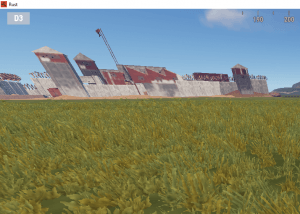
Shows the player’s grid coordinates in the corner of the screen, toggled with /cords. Set the position and size in the config, and give it to everyone or keep it as a VIP perk.
Grid coords, always on screen.
Cords UI shows the player’s grid coordinates in the corner of the screen. Players turn it on or off with one command, and you set the position and size in the config.
Permission-based
Language file support
Watch it in-game
Built to grow your server
Calling out a grid shouldn’t mean opening the map mid-fight.
Better team callouts
Players always know which grid they’re in, so they can call positions to their team without opening the map.
Player experience
A simple VIP perk
Grant it to everyone or keep it for VIPs with its permission.
VIP value
Fits your UI
Change the position and size in the config so it doesn’t clash with your other UI.
Server control
Everything included
- Shows grid coordinates in the corner of the screen
- Config options for UI position and size
- Language file support
- Give it to all players or only VIPs
Commands & permissions
Use the copy button on any command, or click the command to select it.
PermissionsHow to grant permissions →
cordsui.useAllows use of the/cordschat command.cordsui.adminAllows use of thecordsui.wipeconsole command.
Console commandsF1 console, RCON, Tebex or web shop
cordsui.wipeClears all data.Requirescordsui.admin
Player chat commandsAvailable to everyone
/cordsTurns the UI on or off. The command is configurable.Requirescordsui.use
Admin chat commandsStaff only
Requirements & compatibility
Frequently asked
Can I move it?
Can it be VIP only?
cordsui.use can use it.What if I need help?
Make every callout count
Grid coordinates on screen, instant download.
v1.1.1 December 7, 2024 2 years ago Latest
- FIX Fix for this months Rust update.
Only logged in customers who have purchased this product may leave a review.
Related products





Reviews
There are no reviews yet.